
MapReduce介绍
MapReduce (核心:分而治之)是一个分布式计算框架。
MapReduce是由两个阶段组成:Map和Reduce,用户只需要实现map以及reduce两个函数,即可实现分布式计算,这样做的目的是简化分布式程序的开发和调试周期。
只需要继承 Mapper 和 Reducer 类就可以完成分布式编程,它极大地方便了编程人员在不会分布式并行编程的情况下,将程序运行在分布式系统上。
JobTracker/ResourceManager:任务调度者,管理多个NodeManager。ResourceManager是Hadoop2.0版本之后引入Yarn之后用于替代JobTracke部分功能的机制。
TaskTracker/NodeManager:任务执行者。
框架解决了
- 分布式存储
- 作业调度
- 容错
- 机器间的通信问题
MapReduce的基本编程模型
MapReduce是一个分布式运算程序的编程框架,核心功能是将用户编写的业务逻辑代码和自带默认组件整合成一个完整的分布式运算程序,并发运行在Hadoop集群上。
MapReduce工作流程如下图:
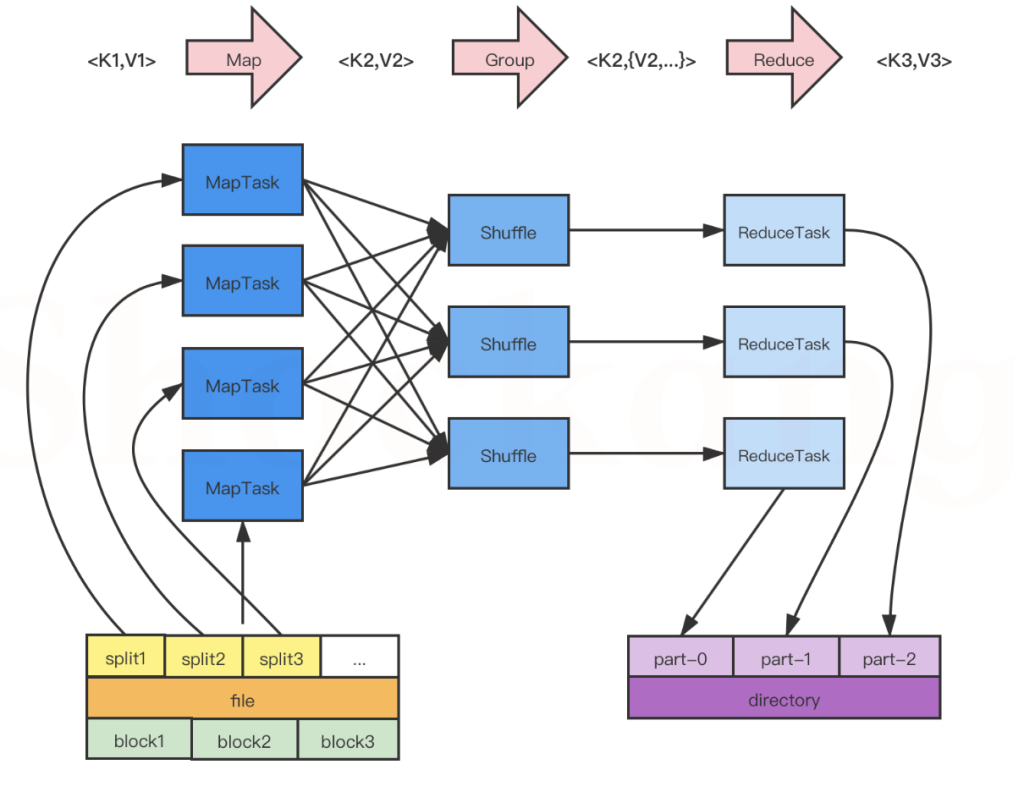
图中所示,大致可以将流程分为5步
- 分片、格式化
- 执行MapTask
- 执行Shuffle
- 执行ReduceTask
- 写入文件
map阶段在进行处理数据的时候,输入输出都是以k,v的形式进行处理的。
k是行偏移量,v是一行数据
例如:数据如下
- hello world
- hello map
- hello reduce
k和v的值分别为:<0, hello wrold>,<12, hello map>
分片、格式化数据源
输入 Map 阶段的数据源,必须经过分片和格式化操作。
- 分片操作:指的是将源文件划分为大小相等的小数据块( Hadoop 2.x 中默认 128MB ),也就是分片( split ),Hadoop 会为每一个分片构建一个 Map 任务,并由该任务运行自定义的 map() 函数,从而处理分片里的每一条记录;
- 格式化操作:将划分好的分片( split )格式化为键值对<key,value>形式的数据,其中, key 代表偏移量, value 代表每一行内容。
map输入文件具体分割方式
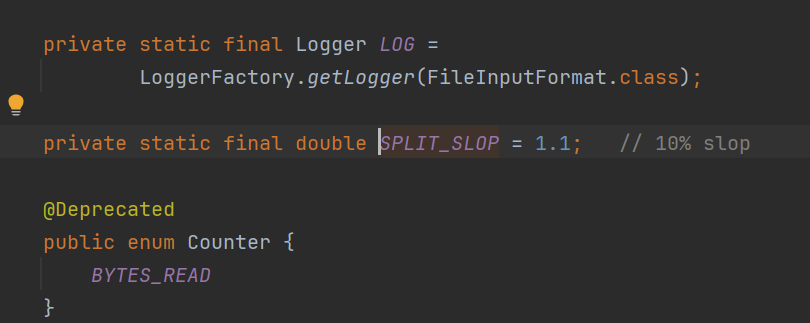
切片与切块不同,切片是切分成多个对象,切块是真正的数据库,不会有这种1.1大小的情况,该是几块就是几块。
mapreduce中生成多少个MapTask是由输入文件的输入分片决定的,有多少输入分片,就会生成多少MapTask。
分片方法
- 首先查看输入文件的压缩格式是否支持split,如果不支持,则一个文件对应一个split;
- 如果支持split,会默认按照一个hdfs块大小对应一个split。
- 如果文件剩余块大小/分块大小>1.1,那会生成两个split;
- 如果文件剩余大小/splitsize<=1.1,剩余的部分作为一个split。
压缩文件是否切分情况如下:
| 压缩格式 | Hadoop自带? | 算法 | 文件扩展名 | 是否可切片 | 换成压缩格式后,原来的程序是否需要修改 |
|---|---|---|---|---|---|
| DEFLATE | 是,直接使用 | DEFLATE | .deflate | 否 | 和文本处理一样,不需要修改 |
| Gzip | 是,直接使用 | DEFLATE | .gz | 否 | 和文本处理一样,不需要修改 |
| bzip2 | 是,直接使用 | bzip2 | .bz2 | 是 | 和文本处理一样,不需要修改 |
| LZO | 否,需要安装 | LZO | .lzo | 是 | 需要创建索引,还需要指定输入格式 |
| Snappy | 是,直接使用 | Snappy | .snappy | 否 | 和文本处理一样,不需要修改 |
MapReduce 通过 org.apache.hadoop.mapreduce.InputSplit 类提供数据切片方法(抽象类)。
- 文件个数
- 文件是否支持split
- hdfs块大小
- 1.1 的系数
源码中可以看到
执行 MapTask
每个 Map 任务都有一个内存缓冲区(缓冲区大小 100MB ),输入的分片( split )数据经过 Map 任务处理后的中间结果会写入内存缓冲区中。
如果写入的数据达到内存缓冲的阈值( 80MB ),会启动一个线程将内存中的溢出数据写入磁盘,同时不影响 Map 中间结果继续写入缓冲区。
在溢写过程中, MapReduce 框架会对 key 进行排序,如果中间结果比较大,会形成多个溢写文件,最后的缓冲区数据也会全部溢写入磁盘形成一个溢写文件,如果是多个溢写文件,则最后合并所有的溢写文件为一个文件。
执行 Shuffle 过程
MapReduce 工作过程中, Map 阶段处理的数据如何传递给 Reduce 阶段,这是 MapReduce 框架中关键的一个过程,这个过程叫作 Shuffle 。
Shuffle 会将 MapTask 输出的处理结果数据分发给 ReduceTask ,并在分发的过程中,对数据按 key 进行分区和排序。
单Reducer情况

多reduce情况
reduce的数量也可以使用代码设置,在job中配置。
// 设置reducetask的数量
job.setNumReduceTasks(2);
有多少个reducer将来就有多少个输出文件,一般reducer的数量和分区的数量是一致的。
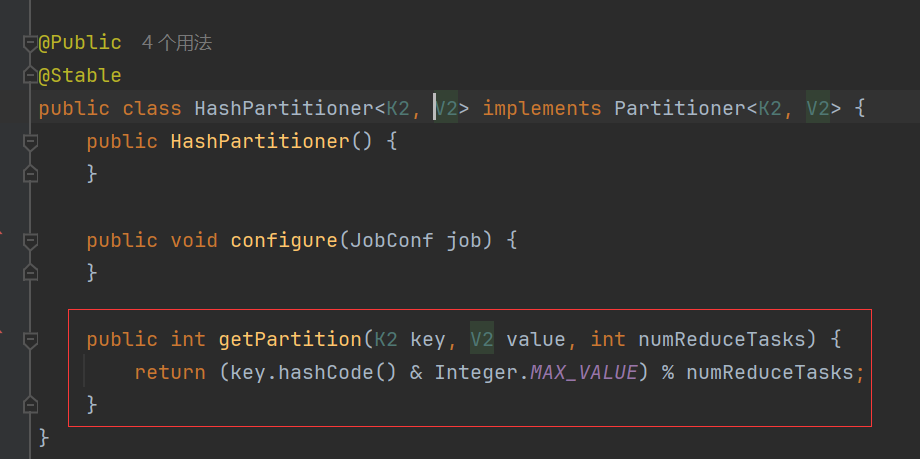
如何确定哪些数据写入哪个Partition?
假设:reduce数量是2
partitionId = key的hash值% reduce的数量
partitionA = key的hash值尾数是0
partitionB = key的hash值尾数是1
如果reduce数量是3
partitionA = key的hash值尾数是0
partitionB = key的hash值尾数是1
partitionC = key的hash值尾数是2
源码如下
输出文件压缩
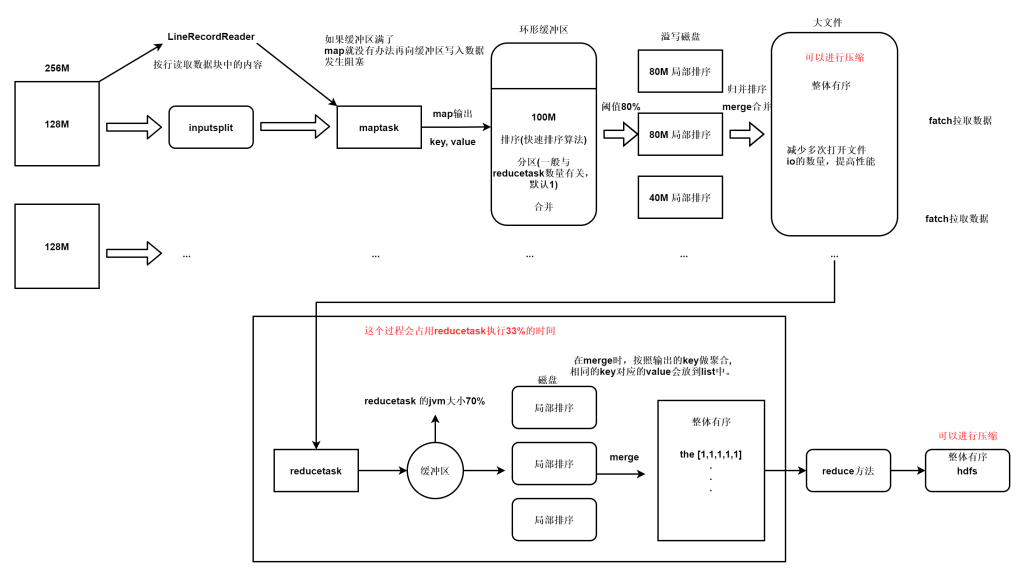
在shuffle过程中,reducer端 拉去数据并进行merge数据 占整个reducer运行进度的33%,但可能因为map阶段文件分布不均导致该阶段耗费50-70%的时间,怎么减少reducer从map拉取的数据量,我们可以设置压缩。
压缩分为map阶段输出压缩,以及reduce阶段输出压缩,可以在配置文件中进行配置默认压缩。
下面的内容配置到mapred-site.xml
  <property>
        <name>mapreduce.map.output.compress</name>
        <value>true</value>
        <description>map是否开启输出压缩</description>
    </property>

    <property>
        <name>mapreduce.map.output.compress.codec</name>
        <value>org.apache.hadoop.io.compress.Bzip2Codec</value>
        <description>map输出默认的算法</description>
    </property>
 <property>
        <name>mapreduce.output.fileoutputformat.compress</name>
        <value>true</value>
        <description>reduce是否开启输出压缩</description>
    </property>

    <property>
        <name>mapreduce.output.fileoutputformat.compress.codec</name>
        <value>org.apache.hadoop.io.compress.Bzip2Codec</value>
        <description>reduce输出默认的算法</description>
    </property>
也可以在代码中开启
设置reducer压缩
// ---设置reduce输出压缩---
// 1)开启reduce输出压缩
FileOutputFormat.setCompressOutput(job, true);
// 2)设置输出压缩格式--gzip
FileOutputFormat.setOutputCompressorClass(job, GzipCodec.class);
设置mapper 压缩
//方式1:
// 开启map输出压缩
conf.set(MRJobConfig.MAP_OUTPUT_COMPRESS, "true");
// 设置输出压缩格式是 Bzip压缩
conf.set(MRJobConfig.MAP_OUTPUT_COMPRESS_CODEC, Bzip2Codec.class.getName());
// 创建运行mapreduce任务的Job对象
// 当创建job对象时,会把 conf里面的所有数据 拷贝到 job对象的Configuration里
Job job = Job.getInstance(conf, "wordcount");

//方式2:
// 开启map输出压缩
job.getConfiguration().set(mapreduce.map.output.compress", "true");
// 设置输出压缩格式是 Bzip压缩
job.getConfiguration().set("mapreduce.map.output.compress.codec", Bzip2Codec.class.getName());
Combiner
特定情况下使用,类似于单词统计这样的需求可以提前对单词在map节点进行统计,适合于提前combiner。但是不适用于所有业务。
提前在map节点进行合并计算,这样输出到reducer的数据量就会变少,reducer的计算压力也会减小。
因为combiner是发生在map输出到缓冲区,在缓冲区完成的。要实现的需求是提前进行累加计算,所以和reduce的功能是一样的,需要实现的方法是reduce方法。
public class WordCountCombiner  extends Reducer<Text, IntWritable,Text,IntWritable> {
    @Override
    //--key就是map输出之后,hadoop框架聚合之后的key values就是相同的key聚合后的数据
    //--hadoop框架聚合之后,有多少个key就会调用多少次reduce方法
    protected void reduce(Text key, Iterable<IntWritable> values, Context context) throws IOException, InterruptedException {

        int sum=0;
        for (IntWritable value : values) {
            int i = value.get();
            sum+=i;
        }

        //--输出
        context.write(key,new IntWritable(sum));
    }
}
在job中进行设置
// 设置combiner,如果与reduce一样,就可以直接使用reduce
job.setCombinerClass(WordCountCombiner.class);
执行 ReduceTask
输入 ReduceTask 的数据流是形式,用户可以自定义 reduce()方法进行逻辑处理,最终以的形式输出。
写入文件
MapReduce 框架会自动把 ReduceTask 生成的传入 OutputFormat 的 write 方法,实现文件的写入操作。
MapTask
map可以分为五个阶段
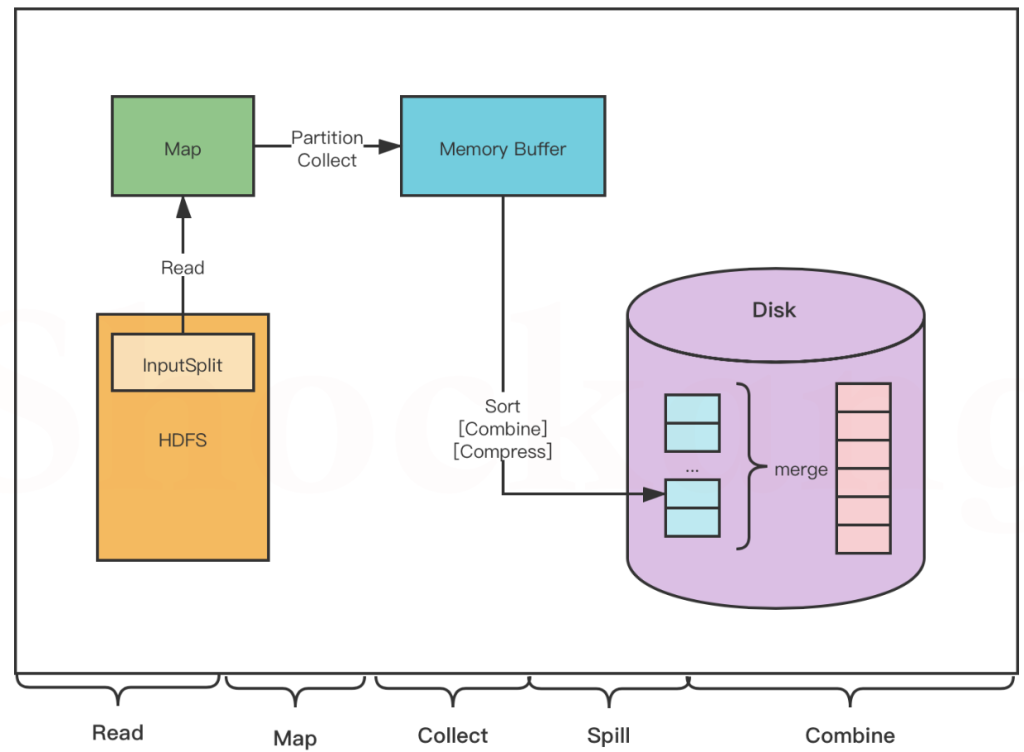
read阶段
MapTask 通过用户编写的 RecordReader ,从输入的 InputSplit 中解析出一个个 key / value 。
Map 阶段
将解析出的 key / value 交给用户编写的 Map ()函数处理,并产生一系列新的 key / value 。
Collect 阶段
在用户编写的 map() 函数中,数据处理完成后,一般会调用 outputCollector.collect() 输出结果,在该函数内部,它会将生成的 key / value 分片(通过调用 partitioner ),并写入一个环形内存缓冲区中(该缓冲区默认大小是 100MB )。
Spill 阶段
即“溢写”,当缓冲区快要溢出时(默认达到缓冲区大小的 80 %),会在本地文件系统创建一个溢出文件,将该缓冲区的数据写入这个文件。
将数据写入本地磁盘前,先要对数据进行一次本地排序,并在必要时对数据进行合并、压缩等操作。
写入磁盘之前,线程会根据 ReduceTask 的数量,将数据分区,一个 Reduce 任务对应一个分区的数据。
这样做的目的是为了避免有些 Reduce 任务分配到大量数据,而有些 Reduce 任务分到很少的数据,甚至没有分到数据的尴尬局面。
如果此时设置了 Combiner ,将排序后的结果进行 Combine 操作,这样做的目的是尽可能少地执行数据写入磁盘的操作。
Combine 阶段
当所有数据处理完成以后, MapTask 会对所有临时文件进行一次合并,以确保最终只会生成一个数据文件。
合并的过程中会不断地进行排序和 Combine 操作,
其目的有两个:一是尽量减少每次写人磁盘的数据量;二是尽量减少下一复制阶段网络传输的数据量。
最后合并成了一个已分区且已排序的文件。
ReduceTask
reduce同样可以分为五个阶段
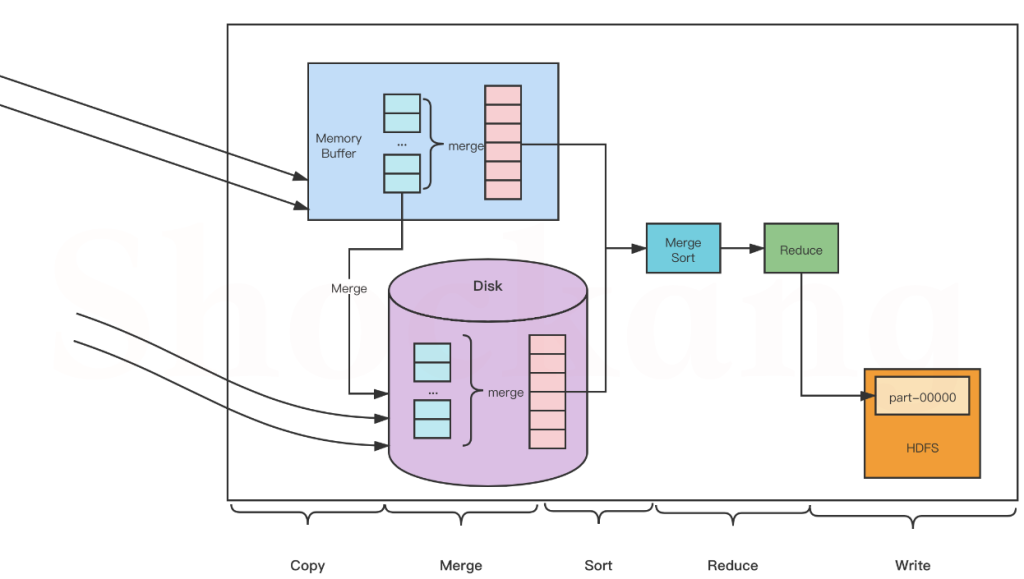
Copy 阶段
Reduce 会从各个 MapTask 上远程复制一片数据(每个 MapTask 传来的数据都是有序的),并针对某一片数据,如果其大小超过一定國值,则写到磁盘上,否则直接放到内存中。
Merge 阶段
在远程复制数据的同时, ReduceTask 会启动两个后台线程,分别对内存和磁盘上的文件进行合并,以防止内存使用过多或者磁盘文件过多。
Sort 阶段
用户编写 reduce() 方法输入数据是按 key 进行聚集的一组数据。
为了将 key 相同的数据聚在一起, Hadoop 采用了基于排序的策略。
由于各个 MapTask 已经实现对自己的处理结果进行了局部排序,因此, ReduceTask 只需对所有数据进行一次归并排序即可。
Reduce 阶段
对排序后的键值对调用 reduce() 方法,键相等的键值对调用一次 reduce()方法,每次调用会产生零个或者多个键值对,最后把这些输出的键值对写入到 HDFS 中。
Write 阶段
reduce() 函数将计算结果写到 HDFS 上。
合并的过程中会产生许多的中间文件(写入磁盘了),但 MapReduce 会让写入磁盘的数据尽可能地少,并且最后一次合并的结果并没有写入磁盘,而是直接输入到 Reduce 函数。
MapReduce中切片和map是一一对应的关系
并不一定是map运行结束reduce才执行。
MapReduce的特性
集群的共同特点:
三角色1.master 2. Slave 3. Client
MapReduce使用的是多进程的并发方式。
每一个进程空间的独享的,进程相对于线程来说,要耗费更多的启动时间,所以MapRedure不适用低延迟的一些作业,所以时效性不高。 Spark使用的多线程并发方式,所以执行相对快。
文件读入方式
大多使用TextFile的格式读入的,明文文件,不压缩,所占空间较大。
SequenceFile <k, v>的方式存储的,也支持压缩,java开发通常是这样的。(lzo 是一个压缩算法)
计数器
计数器是用来记录job的执行进度和状态的。它的作用可以理解为日志。我们可以在程序的某个位置插入计数器,记录数据或者进度的变化情况。
Hadoop 内置计数器根据功能进行分组。每个组包括若干个不同的计数器,分别是:MapReduce 任务计数器(Map-Reduce Framework)、文件系统计数器(File System Counters)、作业计数器(Job Counters)、输入文件任务计数器(File Input Format Counters)、输出文件计数器(File Output Format Counters)
可以配置mapreduce中计数器的数量
 <property>
        <name>mapreduce.job.counters.limit</name>
        <value>20000</value>
        <description>mr允许使用的计数器的最大上限</description>
 </property>
自定义计数器可以查看下方案例
MapReduce优化
推测执行
Straggle(掉队者)是指那些跑的很慢但最终会成功完成的任务。一个掉队的Map任务会阻止Reduce任务开始执行。
Hadoop不能自动纠正掉队任务,但是可以识别那些跑的比较慢的任务,然后它会产生另一个等效的任务作为备份,并使用首先完成的那个任务的结果,此时另外一个任务则会被要求停止执行。这种技术称为推测执行(speculative execution)。
默认是开启推测执行。并不是所有情况都适用,比如需要插入数据的操作,如果一个执行很慢,开启新的map,将老map kill掉后,会造成数据重复的情况。
    <property>
        <name>mapreduce.map.speculative</name>
        <value>true</value>
        <description>是否对Map Task启用推测执行机制</description>
    </property>

    <property>
        <name>mapreduce.reduce.speculative</name>
        <value>true</value>
        <description>是否对Reduce Task启用推测执行机制</description>
    </property>
设置HDFS文件块的大小
块的大小和文件的数量决定了map任务的数量,根据服务器读取数据的速度进行数据块大小设置 一般常见为128M 或者256M。
map buff缓冲区大小
mapreduce.task.io.sort.mb 100 shuffle 的环形缓冲区大小,默认 100m
mapreduce.map.sort.spill.percent 0.8 环形缓冲区溢出的阈值,默认 80%
在mapred-site.xml文件中新增
   <property>
        <name>mapreduce.task.io.sort.mb</name>
        <value>128</value>
        <description>Map Task缓冲区所占内存大小</description>
    </property>
数据倾斜
key设计不均衡的表现, reduce2执行完了,reduce1还在拉取数据,并且reduce2得等着reduce1完成,整个任务才算完成。
reduce1: 90w 个 a
reduce2: 10w 个 b
数据准备
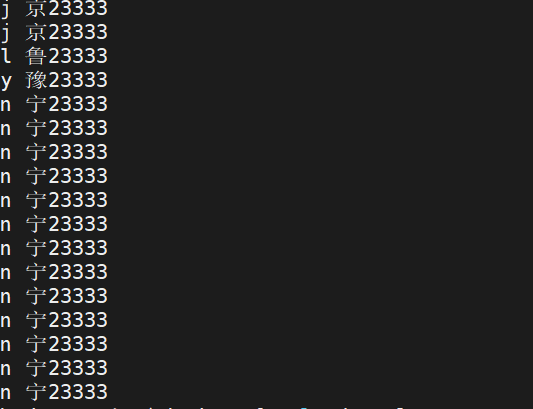
增加标记任务代码
package com.lmk.wcbalance;


import org.apache.hadoop.conf.Configuration;
import org.apache.hadoop.fs.FileSystem;
import org.apache.hadoop.fs.Path;
import org.apache.hadoop.io.IntWritable;
import org.apache.hadoop.io.LongWritable;
import org.apache.hadoop.io.Text;
import org.apache.hadoop.mapreduce.Job;
import org.apache.hadoop.mapreduce.Mapper;
import org.apache.hadoop.mapreduce.Reducer;
import org.apache.hadoop.mapreduce.lib.input.FileInputFormat;
import org.apache.hadoop.mapreduce.lib.output.FileOutputFormat;

import java.io.IOException;

public class WCBalanceDriver {
    public static class WCBalanceMapper extends Mapper<LongWritable, Text, Text, IntWritable> {
        int seq = 1;
        @Override
        protected void map(LongWritable key, Text value, Mapper<LongWritable, Text, Text, IntWritable>.Context context) throws IOException, InterruptedException {
            String[] words = value.toString().split(" ");

            for (String word : words) {
                context.write(new Text(word + "_" + seq++), new IntWritable(1));
                if (seq == 10) {
                    seq = 1;
                }
            }
        }
    }

    public static class WCBalanceReduce extends Reducer<Text, IntWritable, Text, IntWritable> {
        @Override
        protected void reduce(Text key, Iterable<IntWritable> values, Reducer<Text, IntWritable, Text, IntWritable>.Context context) throws IOException, InterruptedException {
            int sum = 0;
            for (IntWritable value : values) {
                sum += value.get();
            }
            context.write(key, new IntWritable(sum));
        }
    }

    public static void main(String[] args) throws IOException, InterruptedException, ClassNotFoundException {
        Configuration conf = new Configuration();
        Job job = Job.getInstance();
        job.setJarByClass(WCBalanceDriver.class);
        job.setMapperClass(WCBalanceMapper.class);
        job.setReducerClass(WCBalanceReduce.class);
        job.setOutputKeyClass(Text.class);
        job.setOutputValueClass(IntWritable.class);
        job.setNumReduceTasks(2);
        FileSystem fs = FileSystem.get(conf);
        if (fs.exists(new Path(args[1]))) {
            fs.delete(new Path(args[1]), true);
        }
        FileInputFormat.addInputPath(job, new Path(args[0]));
        FileOutputFormat.setOutputPath(job, new Path(args[1]));
        boolean b = job.waitForCompletion(true);
        System.exit(b ? 0 : 1);
    }

}
我们这个案例中,如果序列上限设置为2,那就没有意义,因为每一行第一个都标记1,第二个都标记2。导致并没有实现随机parrition的功能。所以一定要大于2。
结果如下
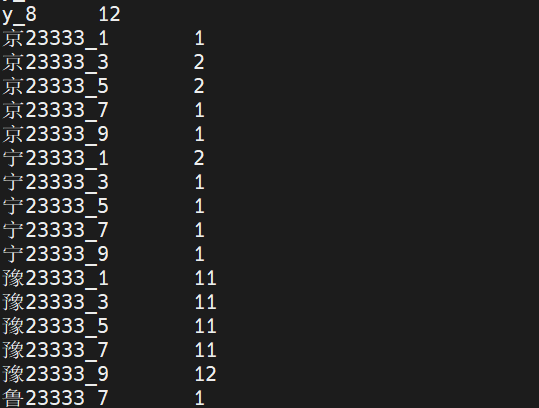
单词统计代码
package com.lmk.wcbalance;

import org.apache.hadoop.conf.Configuration;
import org.apache.hadoop.fs.FileSystem;
import org.apache.hadoop.fs.Path;
import org.apache.hadoop.io.IntWritable;
import org.apache.hadoop.io.LongWritable;
import org.apache.hadoop.io.Text;
import org.apache.hadoop.mapreduce.Job;
import org.apache.hadoop.mapreduce.Mapper;
import org.apache.hadoop.mapreduce.Reducer;
import org.apache.hadoop.mapreduce.lib.input.FileInputFormat;
import org.apache.hadoop.mapreduce.lib.output.FileOutputFormat;

import java.io.IOException;

public class WCBalanceDriver2 {
    public static class WCBalanceMapper2 extends Mapper<LongWritable, Text, Text, IntWritable> {
        @Override
        protected void map(LongWritable key, Text value, Mapper<LongWritable, Text, Text, IntWritable>.Context context) throws IOException, InterruptedException {
            // reduce输出之后不是空格分割了,改成/t分割了
            String[] split = value.toString().split("[_|\\t]");
            context.write(new Text(split[0]), new IntWritable(Integer.parseInt(split[2])));
        }
    }
    public static class WCBalanceReduce2 extends Reducer<Text, IntWritable, Text, IntWritable> {
        @Override
        protected void reduce(Text key, Iterable<IntWritable> values, Reducer<Text, IntWritable, Text, IntWritable>.Context context) throws IOException, InterruptedException {
            int sum = 0;
            for (IntWritable value : values) {
                sum += value.get();
            }
            context.write(key, new IntWritable(sum));
        }
    }

    public static void main(String[] args) throws IOException, InterruptedException, ClassNotFoundException {
        Configuration conf = new Configuration();
        Job job = Job.getInstance();
        job.setJarByClass(WCBalanceDriver2.class);
        job.setMapperClass(WCBalanceMapper2.class);
        job.setReducerClass(WCBalanceReduce2.class);
        job.setOutputKeyClass(Text.class);
        job.setOutputValueClass(IntWritable.class);
        job.setNumReduceTasks(2);
        FileSystem fs = FileSystem.get(conf);
        if (fs.exists(new Path("hdfs://ns1/result/wordcount2"))) {
            fs.delete(new Path("hdfs://ns1/result/wordcount2"), true);
        }
        FileInputFormat.addInputPath(job, new Path("hdfs://ns1/result/wordcount"));
        FileOutputFormat.setOutputPath(job, new Path("hdfs://ns1/result/wordcount2"));
        boolean b = job.waitForCompletion(true);
        System.exit(b ? 0 : 1);
    }
}
增加reduce的个数
reducer的个数决定最终输出文件的个数,可以通过以下方式设定
- job.setNumReduceTasks(2);
- conf.set()
- 通过在mapred-site.xml 配置参数
- 通过 -Dmapreduce.job.reduces 参数设定
参数配置代码
<property>
    <name>mapreduce.job.reduces</name>
    <value>2</value>
    <description>配置reduce个数</description>
</property>
如果四种方式配置冲突了,是存在优先级关系的。
- 如果-D参数和mapred-site.xml 冲突了,-D参数会生效。
- 如果-D参数和conf.set() 或 job api 设置冲突了, 后两者会生效。
- conf.set() 或 job api 设置冲突了,哪个在后面哪个为主
增加copy线程的线程数
在mapred-site.xml 配置参数,增加或减少reduce copy buff缓冲区的大小,增加copy线程的线程数。
<!--调整线程数-->
<property>
        <name>mapreduce.reduce.shuffle.parallelcopies</name>
        <value>24</value>
        <description>作为client端的reduce同时从map端拉取数据的并行度(一次同时从多少个map拉数据),
        每个reduce并行下载map结果的最大线程数</description>
 </property>
    <property>
        <name>mapreduce.tasktracker.http.threads</name>
        <value>40</value>
        <description>作为server端的map用于提供数据传输服务的线程数</description>
    </property>
<!--调整缓冲区大小-->
<property>
        <name>mapreduce.reduce.shuffle.input.buffer.percent</name>
        <value>0.7</value>
 </property>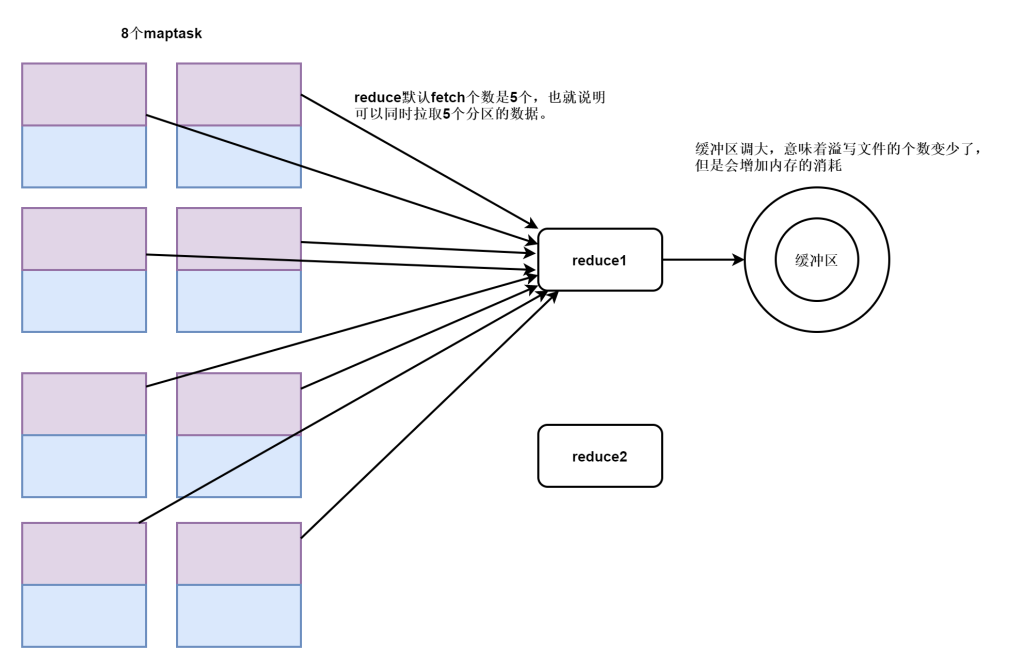
做map的压缩
提前进行combiner的合并
WordCount案例
准备idea环境
创建项目
首先创建maven工程
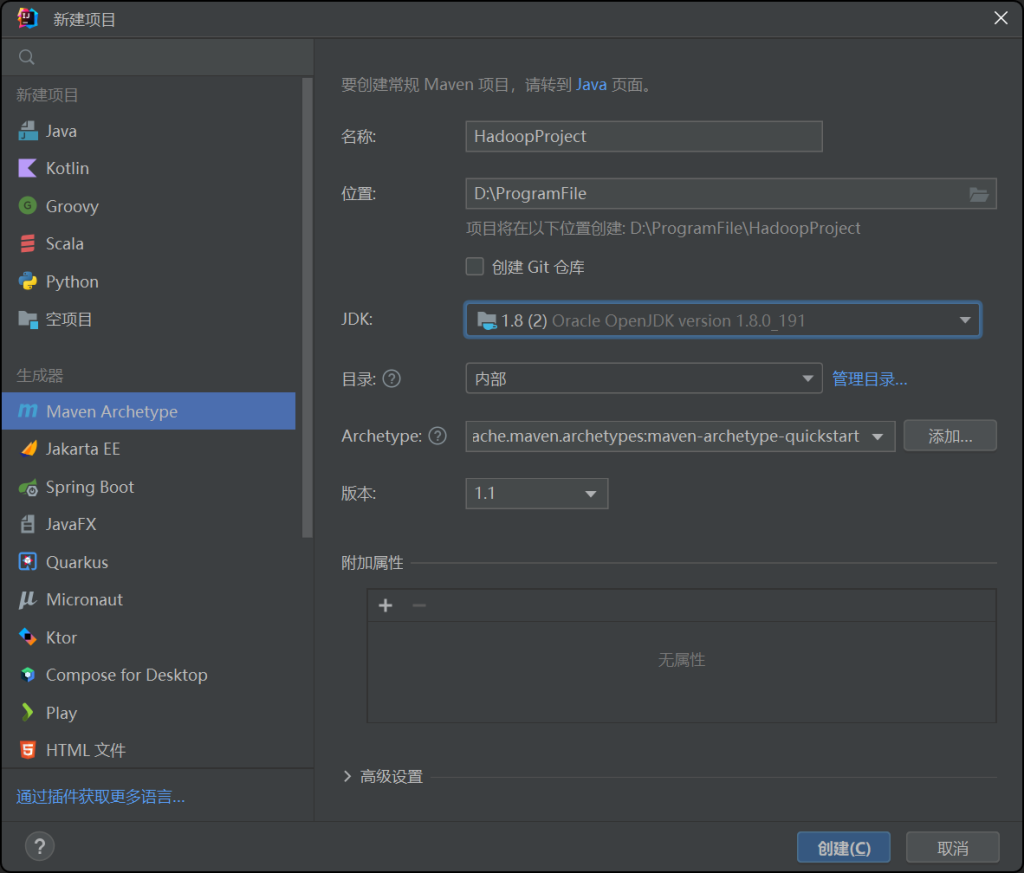
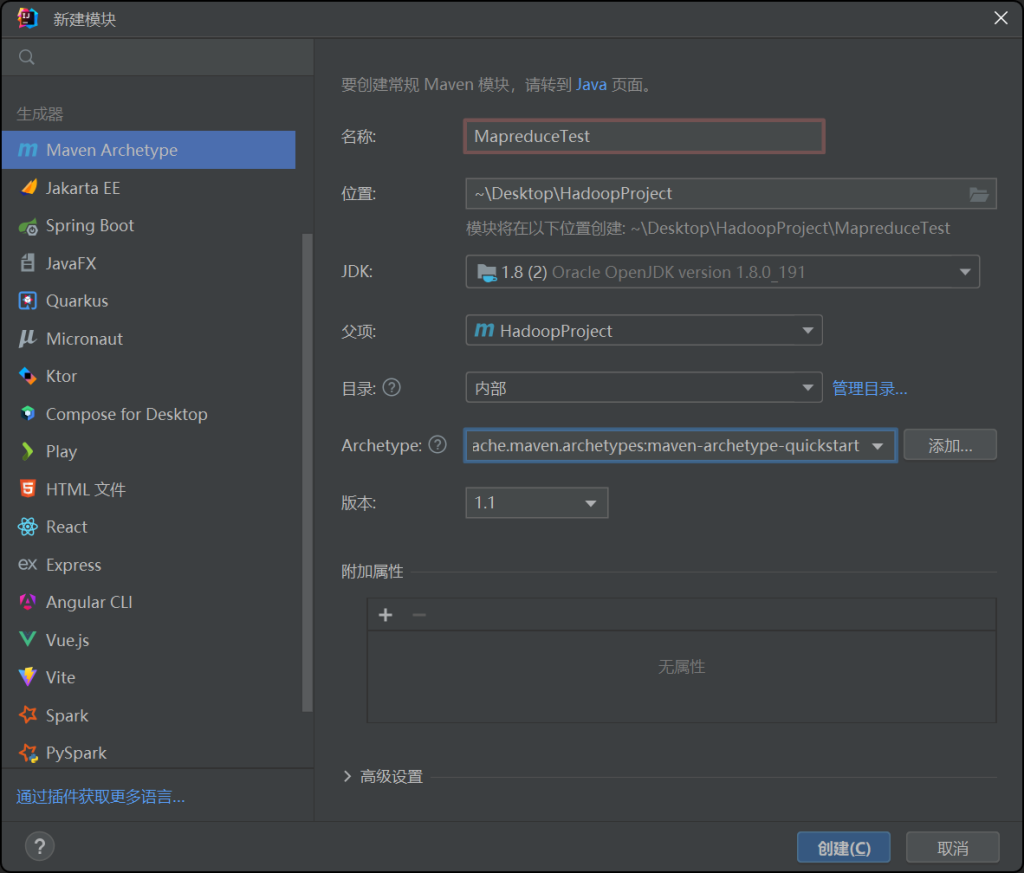
修改pom文件
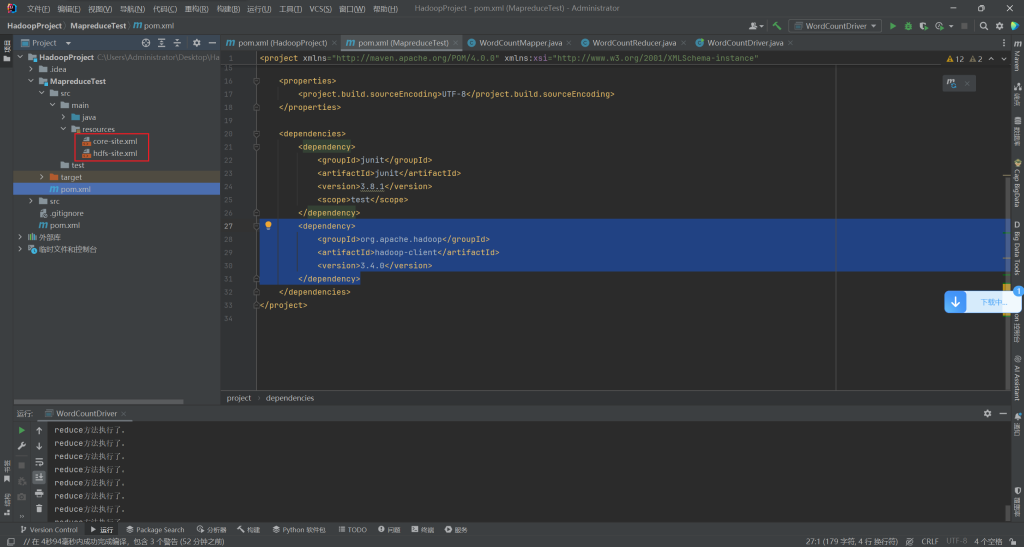
找到模块对应的pom文件,将hadoop依赖包的坐标添加进去。
        <dependency>
            <groupId>org.apache.hadoop</groupId>
            <artifactId>hadoop-client</artifactId>
            <version>3.4.0</version>
        </dependency>
导入集群的配置文件
在main目录下创建一个resources目录,并设置为资源目录,将集群的core-site.xml和hdfs-site.xml放到resources目录下,目的是为了能识别hadoop集群
编写代码
Mapper代码
package com.lmk.wordcount;

import org.apache.commons.math3.fitting.leastsquares.EvaluationRmsChecker;
import org.apache.hadoop.io.*;
import org.apache.hadoop.mapreduce.Counter;
import org.apache.hadoop.mapreduce.Mapper;

import java.io.IOException;
import java.util.ArrayList;
import java.util.List;

/*
 * KEYIN:定义map输入的key的类型
 * VALUEIN:定义map输入的value的类型
 * KEYOUT:定义map输出的key的类型
 * VALUEOUT:定义map输出的value的类型
 * */

public class WordCountMapper extends Mapper<LongWritable, Text, Text, IntWritable > {
    Counter special = null;
    Counter normal = null;

    List<String> list = new ArrayList<String>();
// 自定义计数器
    @Override
    protected void setup(Mapper<LongWritable, Text, Text, IntWritable>.Context context) throws IOException, InterruptedException {
        special = context.getCounter("wordcount", "specialConter");
        normal = context.getCounter("wordcount", "normalConter");
        list.add(".");
        list.add("\"");
        list.add("’");
        list.add("“Oh!");
    }

    Text keyout = new Text();
    IntWritable valueout = new IntWritable();
    @Override
    //每读取一行数据就会调用一次map方法
    //key:行首偏移量
    //value:一行数据
    //Context:是mapreduce的上下文对象,数据输出需要使用此对象
    protected void map(LongWritable key, Text value, Mapper<LongWritable, Text, Text, IntWritable>.Context context) throws IOException, InterruptedException {
//        System.out.println("map任务执行了。");
        // value --> hello world
        String line = value.toString();
        // 进行切分 [hello world]
        String[] words = line.split(" ");
        // 遍历数组
        for (String word : words) {
            if (list.contains(word)){
                special.increment(1);
                continue;
            }else {
                normal.increment(1);
                keyout.set(word);
                valueout.set(1);
                context.write(keyout, valueout);
            }
        }
    }
}
reduce代码
package com.lmk.wordcount;

import org.apache.hadoop.io.IntWritable;
import org.apache.hadoop.io.Text;
import org.apache.hadoop.mapreduce.Reducer;

import java.io.IOException;

/*
* KEYIN:reduce输入的key的类型 --> map输出的key的类型一致
* VALUEIN:reduce输入的value的类型 --> map输出的value的类型一致
* KEYOUT:reduce输出的key的类型
* VALUEOUT:reduce输出的value的类型
 * */
public class WordCountReducer extends Reducer<Text, IntWritable, Text, IntWritable> {
    IntWritable valueout = new IntWritable();
    @Override
    //每输入一次k,v就会调用一次 key v 的形式类似 hello [1,1,1,1,1]
    protected void reduce(Text key, Iterable<IntWritable> values, Reducer<Text, IntWritable, Text, IntWritable>.Context context) throws IOException, InterruptedException {
//        System.out.println("reduce方法执行了。");
        // 定义变量记录每个单词的总次数
        int sum = 0;
        for (IntWritable value : values) {
            int count = value.get();
            sum+=count;
        }
        valueout.set(sum);
        context.write(key, valueout);
    }
}
job代码
package com.lmk.wordcount;

import org.apache.hadoop.conf.Configuration;
import org.apache.hadoop.fs.FileSystem;
import org.apache.hadoop.fs.Path;
import org.apache.hadoop.io.IntWritable;
import org.apache.hadoop.io.Text;
import org.apache.hadoop.io.compress.BZip2Codec;
import org.apache.hadoop.io.compress.GzipCodec;
import org.apache.hadoop.mapreduce.*;
import org.apache.hadoop.mapreduce.lib.input.FileInputFormat;
import org.apache.hadoop.mapreduce.lib.output.FileOutputFormat;
import org.apache.hadoop.security.UserGroupInformation;

import java.io.IOException;

public class WordCountDriver {
    public static void main(String[] args) throws IOException, InterruptedException, ClassNotFoundException {
      //  System.setProperty("hadoop.home.dir", "/path/to/hadoop"); // 指定本地的 Hadoop 安装路径
       // UserGroupInformation ugi = UserGroupInformation.createRemoteUser("hadoop");
        // 定义一个配置文件对象
        Configuration conf = new Configuration();
        // map压缩
        conf.set(MRJobConfig.MAP_OUTPUT_COMPRESS, "true");
        conf.set(MRJobConfig.MAP_OUTPUT_COMPRESS_CODEC, BZip2Codec.class.getName());
        // 创建job任务对象
        Job job = Job.getInstance(conf, "wordcount");
        // 设置入口类
        job.setJarByClass(WordCountDriver.class);
        // 定义mapper类
        job.setMapperClass(WordCountMapper.class);
        // 定义reducer类
        job.setReducerClass(WordCountReducer.class);
        // 定义mapper的输出类型
        job.setMapOutputKeyClass(Text.class);
        job.setMapOutputValueClass(IntWritable.class);
        // 设置combiner
        job.setCombinerClass(WordCountCombiner.class);
        // 定义reducer的输出类型
        job.setOutputKeyClass(Text.class);
        job.setOutputValueClass(IntWritable.class);
        // 设置reducetask的数量
        job.setNumReduceTasks(2);
        // 定义mapreduce要处理的hdfs文件的路径
        // hdfs://ns1/word/The_Man_of_Property.txt
        FileInputFormat.addInputPath(job, new Path(args[0]));
        // 在运行之前,先将输出路径删除
        FileSystem fs = FileSystem.get(conf);
        if (fs.exists(new Path(args[1]))){
            fs.delete(new Path(args[1]), true);
        }
        // 定义mapreduce处理完结果保存路径
        // hdfs://ns1/wdcntresult
        FileOutputFormat.setOutputPath(job, new Path(args[1]));
        // reduce压缩
        FileOutputFormat.setCompressOutput(job, true);
        FileOutputFormat.setOutputCompressorClass(job, GzipCodec.class);
        // 启动job
        boolean b = job.waitForCompletion(true);

        // 获取counter
        Counters counters = job.getCounters();
        CounterGroup wordcount = counters.getGroup("wordcount");
        // 遍历counter组
        for (Counter counter : wordcount) {
            System.out.println(counter.getDisplayName()+":"+counter.getValue());
        }
        Counter special = wordcount.findCounter("specialConter");
        System.out.println(special.getDisplayName()+":"+special.getValue());
        System.exit(b ? 0 : 1);


    }
}
Combiner代码
package com.lmk.wordcount;

import org.apache.hadoop.io.IntWritable;
import org.apache.hadoop.io.Text;
import org.apache.hadoop.mapreduce.Reducer;

import java.io.IOException;

public class WordCountCombiner extends Reducer<Text, IntWritable, Text, IntWritable> {
    IntWritable valueout = new IntWritable();
    @Override
    protected void reduce(Text key, Iterable<IntWritable> values, Reducer<Text, IntWritable, Text, IntWritable>.Context context) throws IOException, InterruptedException {
        int sum = 0;
        for (IntWritable value : values) {
            sum+=value.get();
        }
        valueout.set(sum);
        context.write(key, valueout);
    }
}
增加log4j支持
在项目对应的模块pom文件中增加
<dependency>
    <groupId>org.slf4j</groupId>
    <artifactId>slf4j-log4j12</artifactId>
    <version>1.7.21</version>
</dependency>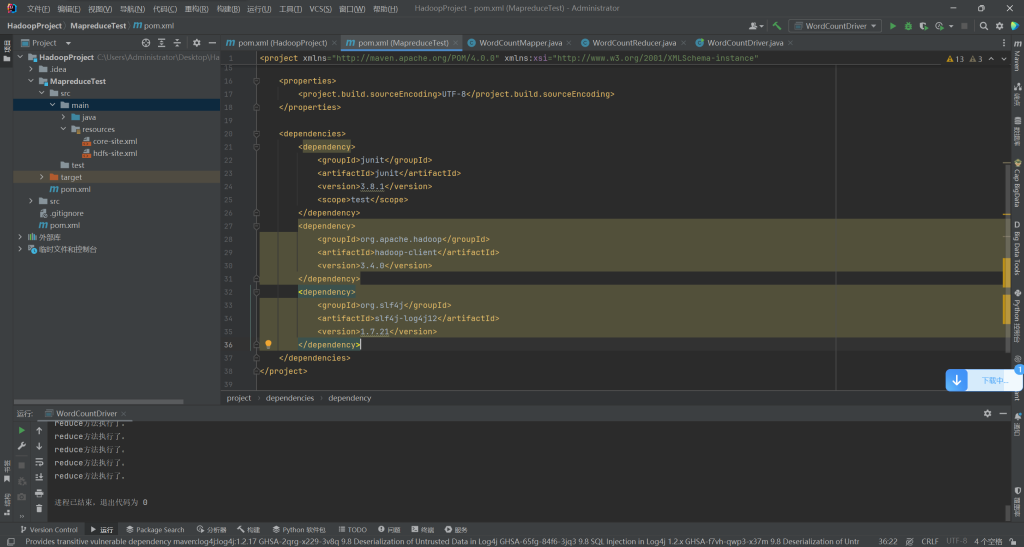
还需要一个配置文件log4j.properties,拷贝下面的文件到新建的resources资源文件夹里,配置文件可以是以下内容:
### 配置根 ###
log4j.rootLogger = debug,console ,fileAppender,dailyRollingFile,ROLLING_FILE,MAIL,DATABASE

### 设置输出sql的级别,其中logger后面的内容全部为jar包中所包含的包名 ###
log4j.logger.org.apache=dubug
log4j.logger.java.sql.Connection=dubug
log4j.logger.java.sql.Statement=dubug
log4j.logger.java.sql.PreparedStatement=dubug
log4j.logger.java.sql.ResultSet=dubug

### 配置输出到控制台 ###
log4j.appender.console = org.apache.log4j.ConsoleAppender
log4j.appender.console.Target = System.out
log4j.appender.console.layout = org.apache.log4j.PatternLayout
log4j.appender.console.layout.ConversionPattern =  %d{ABSOLUTE} %5p %c{ 1 }:%L - %m%n

### 配置输出到文件 ###
log4j.appender.fileAppender = org.apache.log4j.FileAppender
log4j.appender.fileAppender.File = logs/log.log
log4j.appender.fileAppender.Append = true
log4j.appender.fileAppender.Threshold = DEBUG
log4j.appender.fileAppender.layout = org.apache.log4j.PatternLayout
log4j.appender.fileAppender.layout.ConversionPattern = %-d{yyyy-MM-dd HH:mm:ss}  [ %t:%r ] - [ %p ]  %m%n

### 配置输出到文件,并且每天都创建一个文件 ###
log4j.appender.dailyRollingFile = org.apache.log4j.DailyRollingFileAppender
log4j.appender.dailyRollingFile.File = logs/log.log
log4j.appender.dailyRollingFile.Append = true
log4j.appender.dailyRollingFile.Threshold = DEBUG
log4j.appender.dailyRollingFile.layout = org.apache.log4j.PatternLayout
log4j.appender.dailyRollingFile.layout.ConversionPattern = %-d{yyyy-MM-dd HH:mm:ss}  [ %t:%r ] - [ %p ]  %m%n

### 配置输出到文件,且大小到达指定尺寸的时候产生一个新的文件 ###
log4j.appender.ROLLING_FILE=org.apache.log4j.RollingFileAppender
log4j.appender.ROLLING_FILE.Threshold=ERROR
log4j.appender.ROLLING_FILE.File=rolling.log
log4j.appender.ROLLING_FILE.Append=true
log4j.appender.ROLLING_FILE.MaxFileSize=10KB
log4j.appender.ROLLING_FILE.MaxBackupIndex=1
log4j.appender.ROLLING_FILE.layout=org.apache.log4j.PatternLayout
log4j.appender.ROLLING_FILE.layout.ConversionPattern=[framework] %d - %c -%-4r [%t] %-5p %c %x - %m%n

### 配置输出到邮件 ###
log4j.appender.MAIL=org.apache.log4j.net.SMTPAppender
log4j.appender.MAIL.Threshold=FATAL
log4j.appender.MAIL.BufferSize=10
log4j.appender.MAIL.From=chenyl@yeqiangwei.com
log4j.appender.MAIL.SMTPHost=mail.hollycrm.com
log4j.appender.MAIL.Subject=Log4J Message
log4j.appender.MAIL.To=chenyl@yeqiangwei.com
log4j.appender.MAIL.layout=org.apache.log4j.PatternLayout
log4j.appender.MAIL.layout.ConversionPattern=[framework] %d - %c -%-4r [%t] %-5p %c %x - %m%n

### 配置输出到数据库 ###
log4j.appender.DATABASE=org.apache.log4j.jdbc.JDBCAppender
log4j.appender.DATABASE.URL=jdbc:mysql://localhost:3306/test
log4j.appender.DATABASE.driver=com.mysql.jdbc.Driver
log4j.appender.DATABASE.user=root
log4j.appender.DATABASE.password=
log4j.appender.DATABASE.sql=INSERT INTO LOG4J (Message) VALUES ('[framework] %d - %c -%-4r [%t] %-5p %c %x - %m%n')
log4j.appender.DATABASE.layout=org.apache.log4j.PatternLayout
log4j.appender.DATABASE.layout.ConversionPattern=[framework] %d - %c -%-4r [%t] %-5p %c %x - %m%n
log4j.appender.A1=org.apache.log4j.DailyRollingFileAppender
log4j.appender.A1.File=SampleMessages.log4j
log4j.appender.A1.DatePattern=yyyyMMdd-HH'.log4j'
log4j.appender.A1.layout=org.apache.log4j.xml.XMLLayout
实际使用:
#设定控制台和指定目录日志都按照info级别来打印输出,两个通道,分别是console,HFILE,名称不一样就不会走对应通道
log4j.rootLogger=info,console,HFILE2
#日志输出到指定目录
log4j.appender.HFILE=org.apache.log4j.RollingFileAppender
#输出路径自己设置
log4j.appender.HFILE.File=/opt/hainiu_hadoop_logs/log.log
log4j.appender.HFILE.MaxFileSize=30mb
log4j.appender.HFILE.MaxBackupIndex=20
log4j.appender.HFILE.layout=org.apache.log4j.PatternLayout
log4j.appender.HFILE.layout.ConversionPattern=%d{yyyy-MM-dd HH:mm:ss} %p %l %t %r  %c: %m%n
#日志输出到控制台
log4j.appender.console=org.apache.log4j.ConsoleAppender
log4j.appender.console.target=System.out
log4j.appender.console.layout=org.apache.log4j.PatternLayout
log4j.appender.console.layout.ConversionPattern=%d{yy/MM/dd HH:mm:ss} %p %c %M(): %m%n
Join案例1
数据准备
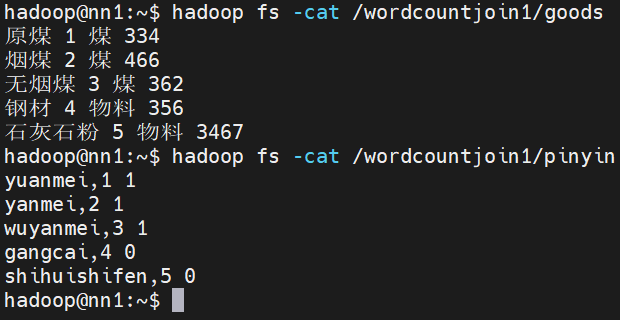
要求:将第二个字段看为id,匹配对应拼音。
内部类及job代码
package com.lmk.join1;

import org.apache.hadoop.conf.Configuration;
import org.apache.hadoop.fs.FileSystem;
import org.apache.hadoop.fs.Path;
import org.apache.hadoop.io.LongWritable;
import org.apache.hadoop.io.NullWritable;
import org.apache.hadoop.io.Text;
import org.apache.hadoop.mapreduce.Job;
import org.apache.hadoop.mapreduce.Mapper;
import org.apache.hadoop.mapreduce.Reducer;
import org.apache.hadoop.mapreduce.lib.input.FileInputFormat;
import org.apache.hadoop.mapreduce.lib.output.FileOutputFormat;

import java.io.IOException;
import java.util.ArrayList;
import java.util.List;

public class Join1Driver {

    public static class Join1Mapper extends Mapper<LongWritable, Text, Text, Text>{
        @Override
        protected void map(LongWritable key, Text value, Mapper<LongWritable, Text, Text, Text>.Context context) throws IOException, InterruptedException {
            String line = value.toString();
            if (line.contains(",")){
                String id = line.replaceAll(",", " ").split(" ")[1];
                context.write(new Text(id), value);
            }else {
                String id = line.split(" ")[1];
                context.write(new Text(id), value);
            }

        }
    }
    // 如果不想输出可以将输出类型定义为NullWritable
    public static class Join1Reducer extends Reducer<Text, Text, Text, NullWritable>{
        @Override
        // key -- 001
        // value -- [原煤 1 煤 334 yuanmei,1 1 烟煤 2 煤 466 ...]
        protected void reduce(Text key, Iterable<Text> values, Reducer<Text, Text, Text, NullWritable>.Context context) throws IOException, InterruptedException {
            String pinyininfo = null;
            List<String> goodsinfo = new ArrayList<String>();
            for (Text value : values) {
                if (value.toString().contains(",")){
                    pinyininfo = value.toString();
                }else {
                    goodsinfo.add(value.toString());
                }
            }
            // 遍历goods中的数据,进行替换操作 原煤 1 煤 334
            for (String s : goodsinfo) {
                String[] pinyin = null;
                if (pinyininfo != null) {
                    pinyin = pinyininfo.replaceAll(",", " ").split(" ");
                    String allstring = s.replaceFirst(pinyin[1], pinyin[0] + " " + pinyin[2]);
                    System.out.println(allstring);
                    context.write(new Text(allstring), NullWritable.get());
                }

            }
        }
    }

    public static void main(String[] args) throws Exception {
        Configuration conf = new Configuration();
        Job job = Job.getInstance(conf, "join1");

        job.setJarByClass(Join1Driver.class);
        job.setMapperClass(Join1Mapper.class);
        job.setReducerClass(Join1Reducer.class);
        job.setMapOutputKeyClass(Text.class);
        job.setMapOutputValueClass(Text.class);
        job.setOutputKeyClass(Text.class);
        job.setOutputValueClass(NullWritable.class);

        FileSystem fs = FileSystem.get(conf);

        if(fs.exists(new Path(args[2]))){
            fs.delete(new Path(args[2]), true);
        }

        FileInputFormat.addInputPath(job, new Path(args[0]));
        FileInputFormat.addInputPath(job, new Path(args[1]));
        FileOutputFormat.setOutputPath(job, new Path(args[2]));

        boolean b = job.waitForCompletion(true);
        System.exit(b?0:1);

    }

}
Join2案例
数据准备
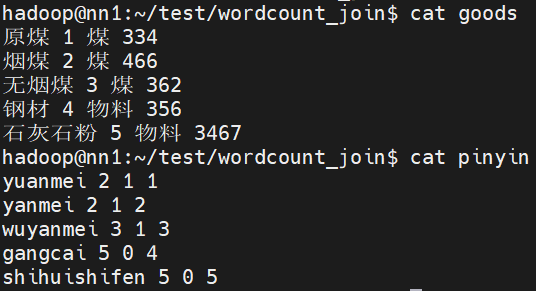
要求:
生成类似 原煤 煤 yuanmei 1
内部类及job代码
package com.lmk.join2;

import org.apache.hadoop.conf.Configuration;
import org.apache.hadoop.fs.FileSystem;
import org.apache.hadoop.fs.Path;
import org.apache.hadoop.io.LongWritable;
import org.apache.hadoop.io.NullWritable;
import org.apache.hadoop.io.Text;
import org.apache.hadoop.mapreduce.Job;
import org.apache.hadoop.mapreduce.Mapper;
import org.apache.hadoop.mapreduce.Reducer;
import org.apache.hadoop.mapreduce.lib.input.FileInputFormat;
import org.apache.hadoop.mapreduce.lib.input.FileSplit;
import org.apache.hadoop.mapreduce.lib.output.FileOutputFormat;

import java.io.IOException;

public class Join2Driver {
    public static class Join2Mapper extends Mapper<LongWritable, Text, Text, Text>{
        String prefix = null;
        String filename = null;
        @Override
        protected void setup(Mapper<LongWritable, Text, Text, Text>.Context context) throws IOException, InterruptedException {
            // 获取文件的切片对象
            FileSplit inputSplit = (FileSplit) context.getInputSplit();
            filename = inputSplit.getPath().getName();
            if (filename.contains("goods")){
                prefix = "g_";
            }else {
                prefix = "p_";
            }
        }

        @Override
        protected void map(LongWritable key, Text value, Mapper<LongWritable, Text, Text, Text>.Context context) throws IOException, InterruptedException {
            String line = value.toString();
            if(filename.contains("goods")){
                String keyout = line.split(" ")[1];
                String valueout = prefix + value.toString();
                context.write(new Text(keyout), new Text(valueout));
            }else {
                String keyout = line.split(" ")[3];
                String valueout = prefix + value.toString();
                context.write(new Text(keyout), new Text(valueout));
            }
        }
    }
    // values [g_原煤 1 煤 334 p_yuanmei 2 1 1]
    public static class Join2Reducer extends Reducer<Text, Text, Text, NullWritable>{
        String goodsinfo = null;
        String pinyininfo = null;
        @Override
        protected void reduce(Text key, Iterable<Text> values, Reducer<Text, Text, Text, NullWritable>.Context context) throws IOException, InterruptedException {
            for (Text value : values) {
                if (value.toString().startsWith("g_")){
                    goodsinfo = value.toString();
                }else {
                    pinyininfo = value.toString();
                }
            }
            // [g 原煤 1 煤 334]
            String[] gooddatas = goodsinfo.split("[_| ]");
            // [p yuanmei 2 1 1]
            String[] pinyindatas = pinyininfo.split("[_| ]");
            String allstring = gooddatas[1] + " " + gooddatas[3] + " " + pinyindatas[1] + " " + pinyindatas[3];
            context.write(new Text(allstring), NullWritable.get());

        }
    }

    public static void main(String[] args) throws Exception {
        Configuration conf = new Configuration();
        Job job = Job.getInstance(conf, "join2");

        job.setJarByClass(Join2Driver.class);
        job.setMapperClass(Join2Mapper.class);
        job.setReducerClass(Join2Reducer.class);
        job.setMapOutputKeyClass(Text.class);
        job.setMapOutputValueClass(Text.class);
        job.setOutputKeyClass(Text.class);
        job.setOutputValueClass(NullWritable.class);

        FileSystem fs = FileSystem.get(conf);

        if (fs.exists(new Path(args[2]))){
            fs.delete(new Path(args[2]),true);

        }

        FileInputFormat.addInputPath(job, new Path(args[0]));
        FileInputFormat.addInputPath(job, new Path(args[1]));
        FileOutputFormat.setOutputPath(job, new Path(args[2]));

        boolean b = job.waitForCompletion(true);
        System.exit(b?0:1);

    }

}
结果如下

MapJoin 案例
我们都知道mapreduce是基于磁盘的,这样产生大量磁盘IO,所以性能低,处理时间长。
mapjoin:不需要进行shuffle流程,也不需要reduce处理。
适用于大表join小表,使用DistributedCache机制将小表存储到各个Mapper进程所在机器的磁盘空间上,各个Mapper进程读取不同的大表分片,将分片中的每一条记录与小表中所有记录进行合并 合并后直接输出map结果即可得到最终结果。
小文件缓存到MapTask所在的服务器后,会放到一个tmp开头的临时目录。并且在项目的根路径下创建一个小文件的软连接,指向缓存文件的本地真实路径。

如果不设置reduce数量,默认还是会有一个reduce。
数据准备
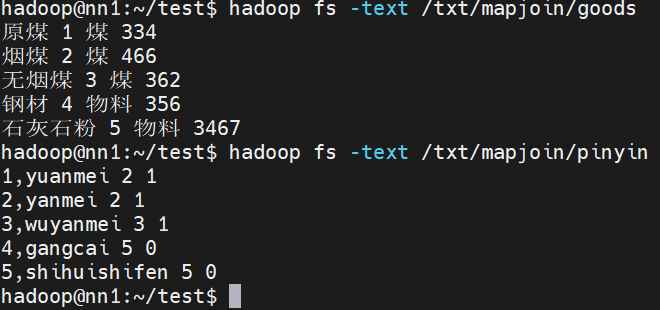
要求生成如下内容:
原煤 yuanmei 2 1 煤 334
内部类及job代码
package com.lmk.mapjoin;

import org.apache.hadoop.conf.Configuration;
import org.apache.hadoop.fs.FileSystem;
import org.apache.hadoop.fs.Path;
import org.apache.hadoop.io.IntWritable;
import org.apache.hadoop.io.LongWritable;
import org.apache.hadoop.io.NullWritable;
import org.apache.hadoop.io.Text;
import org.apache.hadoop.mapreduce.Job;
import org.apache.hadoop.mapreduce.Mapper;
import org.apache.hadoop.mapreduce.lib.input.FileInputFormat;
import org.apache.hadoop.mapreduce.lib.output.FileOutputFormat;

import java.io.BufferedReader;
import java.io.FileInputStream;
import java.io.IOException;
import java.io.InputStreamReader;
import java.net.URI;
import java.util.HashMap;
import java.util.Map;

public class MapJoinDriver {
    public static void main(String[] args) throws Exception {
        Configuration conf = new Configuration();
        Job job = Job.getInstance(conf, "mapjoin");
        job.setJarByClass(MapJoinDriver.class);
        job.setMapperClass(MapJoinMapper.class);
        job.setMapOutputKeyClass(Text.class);
        job.setMapOutputValueClass(Text.class);

        //--不要reduce要将reducetask的数量设置为0
        job.setNumReduceTasks(0);

        // 将小文件缓存到MapTask所在机器的磁盘,读取到内存中,方便与大文件join
        job.addCacheFile(new URI("hdfs://ns1/txt/mapjoin/pinyin"));
        //--判断输出目录是否存在,如果存在就删除
        //--获取hdfs文件系统对象--面向对象
        FileSystem fs=FileSystem.get(conf);
        if (fs.exists(new Path("hdfs://ns1/result/mapjoinresult"))){
            fs.delete(new Path("hdfs://ns1/result/mapjoinresult"),true);
        }

        // 要处理的文件
        FileInputFormat.addInputPath(job, new Path("hdfs://ns1/txt/mapjoin/goods"));
        FileOutputFormat.setOutputPath(job, new Path("hdfs://ns1/result/mapjoinresult"));

        boolean b = job.waitForCompletion(true);
        System.exit(b?0:1);

    }

    public static class MapJoinMapper extends Mapper<LongWritable, Text, Text, NullWritable>{
        Map<String, String> map= new HashMap<String, String>();
        @Override
        protected void setup(Mapper<LongWritable, Text, Text, NullWritable>.Context context) throws IOException, InterruptedException {
            URI[] cacheFiles = context.getCacheFiles();
            URI cacheFile = cacheFiles[0];
            String path = cacheFile.getPath();
            System.out.println(path);
            // 获取本地pinyin文件,需要本地pinyin的名称
            String name = path.substring(path.lastIndexOf("/")+1);
            // 准备一个输出流
            FileInputStream in = new FileInputStream(name);
            // 将字节流转化成字符流,用于一行一行读取数据
            BufferedReader bf = new BufferedReader(new InputStreamReader(in));
            // 准备变量,用于接收读取到的一行数据
            String line = null;
            while ((line = bf.readLine()) != null){
                String[] split = line.split(",");
                map.put(split[0], split[1]);
            }
            // 关流
            bf.close();
            in.close();
        }

        @Override
        protected void map(LongWritable key, Text value, Mapper<LongWritable, Text, Text, NullWritable>.Context context) throws IOException, InterruptedException {
            String line = value.toString();
            String[] datas = line.split(" ");
            String num = datas[1];
            String pinyin = map.get(num);
            // 关联不到的数据处理
            // pinyin = pinyin == null?"null 1":pinyin;
            String allstring = datas[0] + " " + pinyin + " " + datas[2] + " " + datas[3];
            context.write(new Text(allstring), NullWritable.get());
        }
    }
}
结果如下

自定义序列化类 Flow案例
在Hadoop的集群工作过程中,一般是利用RPC来进行集群节点之间的通信和消息的传输,所以要求MapReduce处理的对象必须可以进行序列化/反序列操作。
Hadoop并没有使用Java原生的序列化,而是利用的是Avro实现的序列化和反序列,并且在其基础上进行了更好的封装,提供了便捷的API。
在Hadoop中要求被序列化的对象对应的类必须实现Writable接口。
序列化过程中要求属性值不能为null。
数据准备
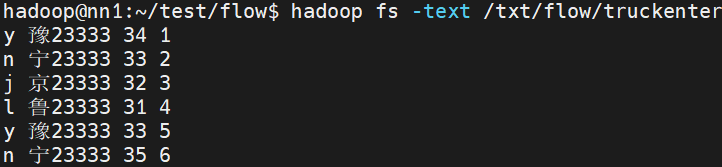
需求按照code,车牌分组,对净重求和。
生成 n_宁23333 68
Flow代码
package com.lmk.flow;

import org.apache.hadoop.io.Writable;

import java.io.DataInput;
import java.io.DataOutput;
import java.io.IOException;

public class Flow implements Writable {
    private String code = null;
    private String truck = null;
    private int netweight;
    private String id = null;

    public Flow(String code, String truck, int netweight, String id) {
        this.code = code;
        this.truck = truck;
        this.netweight = netweight;
        this.id = id;
    }

    public Flow() {
    }

    public String getCode() {
        return code;
    }

    public void setCode(String code) {
        this.code = code;
    }

    public String getTruck() {
        return truck;
    }

    public void setTruck(String truck) {
        this.truck = truck;
    }

    public int getNetweight() {
        return netweight;
    }

    public void setNetweight(int netweight) {
        this.netweight = netweight;
    }

    public String getId() {
        return id;
    }

    public void setId(String id) {
        this.id = id;
    }

    @Override
    public String toString() {
        return "Flow{" +
                "code='" + code + '\'' +
                ", truck='" + truck + '\'' +
                ", netweight=" + netweight +
                ", id='" + id + '\'' +
                '}';
    }

    @Override
    // 序列化
    public void write(DataOutput dataOutput) throws IOException {
        dataOutput.writeUTF(code);
        dataOutput.writeUTF(truck);
        dataOutput.writeInt(netweight);
        dataOutput.writeUTF(id);
    }

    @Override
    // 反序列化
// 反序列化的顺序和序列化的顺序要一致
    public void readFields(DataInput dataInput) throws IOException {
        this.code = dataInput.readUTF();
        this.truck = dataInput.readUTF();
        this.netweight = dataInput.readInt();
        this.id = dataInput.readUTF();
    }
}
FlowDriver代码
package com.lmk.flow;

import org.apache.hadoop.conf.Configuration;
import org.apache.hadoop.fs.FileSystem;
import org.apache.hadoop.fs.Path;
import org.apache.hadoop.io.IntWritable;
import org.apache.hadoop.io.LongWritable;
import org.apache.hadoop.io.Text;
import org.apache.hadoop.mapreduce.Job;
import org.apache.hadoop.mapreduce.Mapper;
import org.apache.hadoop.mapreduce.Reducer;
import org.apache.hadoop.mapreduce.lib.input.FileInputFormat;
import org.apache.hadoop.mapreduce.lib.output.FileOutputFormat;

import java.io.IOException;

public class FlowDriver {
    public static class FlowMap extends Mapper<LongWritable, Text, Text, Flow> {
        @Override
        protected void map(LongWritable key, Text value, Mapper<LongWritable, Text, Text, Flow>.Context context) throws IOException, InterruptedException {
            String line = value.toString();
            String[] datas = line.split(" ");
            Flow f = new Flow();
            f.setCode(datas[0]);
            f.setTruck(datas[1]);
            f.setNetweight(Integer.parseInt(datas[2]));
            f.setId(datas[3]);

            context.write(new Text(f.getTruck()), f);
        }
    }

    public static class FlowReduce extends Reducer<Text, Flow, Text, IntWritable> {
        @Override
        protected void reduce(Text key, Iterable<Flow> values, Reducer<Text, Flow, Text, IntWritable>.Context context) throws IOException, InterruptedException {
            int sum = 0;
            String code = null;
            for (Flow f : values) {
                sum += f.getNetweight();
                code = f.getCode();
            }
            IntWritable out = new IntWritable(sum);
            String keyout = code + "_" +key.toString();
            context.write(new Text(keyout), out);
        }
    }

    public static void main(String[] args) throws IOException {
        Configuration conf = new Configuration();
        Job job = Job.getInstance(conf, "flow");
        job.setJarByClass(FlowDriver.class);
        job.setMapperClass(FlowMap.class);
        job.setReducerClass(FlowReduce.class);
        job.setMapOutputKeyClass(Text.class);
        job.setMapOutputValueClass(Flow.class);
        job.setOutputKeyClass(Text.class);
        job.setOutputValueClass(IntWritable.class);

        FileSystem fs=FileSystem.get(conf);
        if (fs.exists(new Path(args[1]))){
            fs.delete(new Path(args[1]),true);
        }

        FileInputFormat.addInputPath(job, new Path(args[0]));
        FileOutputFormat.setOutputPath(job, new Path(args[1]));

        try {
            boolean b = job.waitForCompletion(true);
            System.exit(b ? 0 : 1);
        } catch (Exception e) {
            e.printStackTrace();
        }
    }

}
结果如下

自定义分区案例
分区操作是shuffle操作中的一个重要过程,作用就是将map的结果按照规则分发到不同reduce中进行处理,从而按照分区得到多个输出结果。
Partitioner是分区的基类,如果需要定制partitioner也需要继承该类。
HashPartitioner是MapReduce的默认partitioner。
计算方法是:which reducer=(key.hashCode() & Integer.MAX_VALUE) % numReduceTasks。上面也有提到。
默认情况下,reduceTask数量为1。
很多时候MapReduce自带的分区规则并不能满足业务需求,为了实现特定的效果,可以需要自己来定义分区规则。
如果定义了几个分区,则需要定义对应数量的ReduceTask。
注意,reducetask的数量需要大于等于自定义分区数量。除非是默认1的情况下,所有的数据都会到一个reduce任务中。分区数量大于reduce数量会报错。
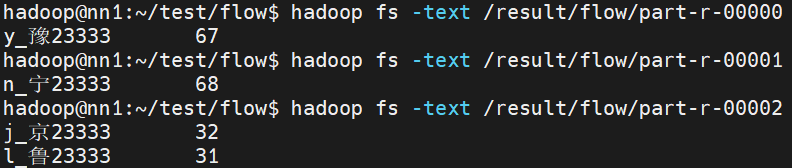
需求:按照code进行分区
FlowPartitioner 代码
package com.lmk.flow;

import org.apache.hadoop.io.Text;
import org.apache.hadoop.mapreduce.Partitioner;
// 分区的操作发生在map输出之后的
// key指的是map输出的key的类型
// value指的是map输出的value的类型
public class FlowPartitioner extends Partitioner<Text, Flow> {

    @Override
    public int getPartition(Text text, Flow flow, int numPartitions) {
        if (flow.getCode().equals("y")) {
            return 0;
        } else if (flow.getCode().equals("n")) {
            return 1;
        } else{
            return 2;
        }
    }
}
Driver 增加代码
        // 指定自定义分区类
        job.setPartitionerClass(FlowPartitioner.class);
        job.setNumReduceTasks(3);
结果如下
排序案例
Map执行过后,在数据进入reduce操作之前,数据将会按照输出的Key进行排序,利用这个特性可以实现大数据场景下排序的需求。
要排序的对象对应类实现WritableComparable接口,根据返回值的正负决定排序顺序。
数据准备
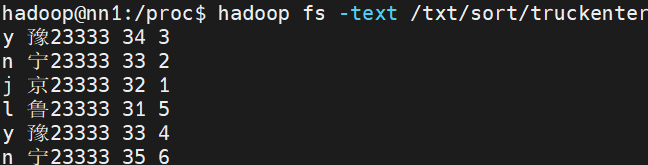
要求:按照最后一个字段排序
WritableComparable类代码
package com.lmk.Sort;

import org.apache.hadoop.io.WritableComparable;

import java.io.DataInput;
import java.io.DataOutput;
import java.io.IOException;

public class Truck implements WritableComparable<Truck> {
    private String code = "";
    private String truck = "";
    private int netweight = 0;
    private int id = 0;

    public String getCode() {
        return code;
    }

    public void setCode(String code) {
        this.code = code;
    }

    public String getTruck() {
        return truck;
    }

    public void setTruck(String truck) {
        this.truck = truck;
    }

    public int getNetweight() {
        return netweight;
    }

    public void setNetweight(int netweight) {
        this.netweight = netweight;
    }

    public int getId() {
        return id;
    }

    public void setId(int id) {
        this.id = id;
    }

    @Override
    public String toString() {
        return code +
                " " + truck +
                " " + netweight +
                " " + id;
    }

    public Truck(String code, String truck, int netweight, int id) {
        this.code = code;
        this.truck = truck;
        this.netweight = netweight;
        this.id = id;
    }

    public Truck() {
    }

    @Override
    public int compareTo(Truck o) {
        // this 在前正序,this 在后降序
        return o.id - this.id;
    }

    @Override
    // 序列化
    public void write(DataOutput dataOutput) throws IOException {
        dataOutput.writeUTF(code);
        dataOutput.writeUTF(truck);
        dataOutput.writeInt(netweight);
        dataOutput.writeInt(id);
    }

    @Override
    public void readFields(DataInput dataInput) throws IOException {
        this.code = dataInput.readUTF();
        this.truck = dataInput.readUTF();
        this.netweight = dataInput.readInt();
        this.id = dataInput.readInt();
    }
}
Driver代码
package com.lmk.Sort;

import org.apache.hadoop.conf.Configuration;
import org.apache.hadoop.fs.FileSystem;
import org.apache.hadoop.fs.Path;
import org.apache.hadoop.io.LongWritable;
import org.apache.hadoop.io.NullWritable;
import org.apache.hadoop.io.Text;
import org.apache.hadoop.mapreduce.Job;
import org.apache.hadoop.mapreduce.Mapper;
import org.apache.hadoop.mapreduce.Reducer;
import org.apache.hadoop.mapreduce.lib.input.FileInputFormat;
import org.apache.hadoop.mapreduce.lib.output.FileOutputFormat;

import java.io.IOException;

public class SortDriver {
    public static class SortMap extends Mapper<LongWritable, Text, Truck, NullWritable> {
        @Override
        protected void map(LongWritable key, Text value, Mapper<LongWritable, Text, Truck, NullWritable>.Context context) throws IOException, InterruptedException {
            String[] s = value.toString().split(" ");
            Truck truck = new Truck(s[0], s[1], Integer.parseInt(s[2]), Integer.parseInt(s[3]));
           // 这里一定要用Truck 对象作为输出键。如果不是Truck,Hadoop 默认的排序机制仍然不会按照这个想要的方式排序
            // context.write(new Text(truck.toString()), NullWritable.get());
            context.write(truck, NullWritable.get());
        }
    }

    public static class SortReduce extends Reducer<Truck, NullWritable, Text, NullWritable> {
        @Override
        protected void reduce(Truck key, Iterable<NullWritable> values, Reducer<Truck, NullWritable, Text, NullWritable>.Context context) throws IOException, InterruptedException {
            context.write(new Text(key.toString()), NullWritable.get());
        }
    }

    public static void main(String[] args) throws IOException, InterruptedException, ClassNotFoundException {
        Configuration conf = new Configuration();
        Job job = Job.getInstance(conf, "sort");

        job.setJarByClass(SortDriver.class);
        job.setMapperClass(SortMap.class);
        job.setReducerClass(SortReduce.class);
        job.setMapOutputKeyClass(Truck.class);
        job.setMapOutputValueClass(NullWritable.class);
        // 如果map和reduce的输出类型是一致的,可以只定义reduce的输出类型
        job.setOutputKeyClass(Text.class);
        job.setOutputValueClass(NullWritable.class);

        FileSystem fs = FileSystem.get(conf);
        if (fs.exists(new Path(args[1]))) {
            fs.delete(new Path(args[1]), true);
        }

        FileInputFormat.addInputPath(job, new Path(args[0]));
        FileOutputFormat.setOutputPath(job, new Path(args[1]));

        boolean b = job.waitForCompletion(true);
        System.exit(b?0:1);

    }
}
这里我原本想要在map输出的时候输出自己想要的内容,发现修改后排序就变回原来的默认的sort了。
因为Text是 Hadoop 自带的实现了WritableComparable接口的类,其 compareTo方法是基于字符串的字典序进行比较的,而不是我们自己写的排序方式。
map的输出key,reduce输入key必须是自定义的对象才可以。
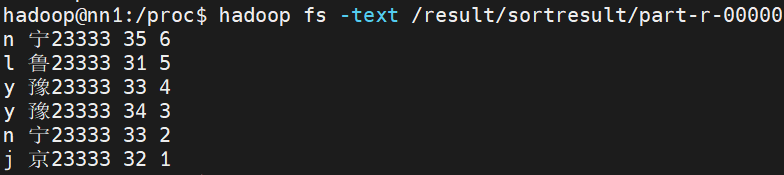
输出结果:
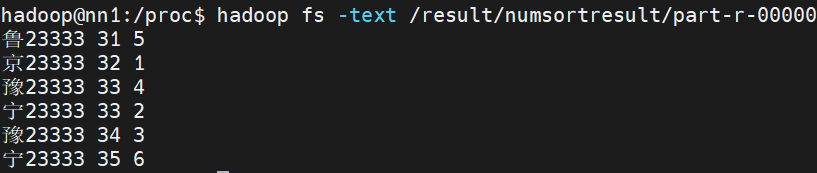
二次排序案例
数据准备
需求先按照净重升序排序,相同的按照id降序排序
numsort代码
package com.lmk.numsort;

import org.apache.hadoop.io.WritableComparable;

import java.io.DataInput;
import java.io.DataOutput;
import java.io.IOException;

public class NumSort implements WritableComparable<NumSort> {
    private String truck = "";
    private int num1;
    private int num2;

    @Override
    public String toString() {
        return truck +
                " " + num1 +
                " " + num2;
    }

    public String getTruck() {
        return truck;
    }

    public void setTruck(String truck) {
        this.truck = truck;
    }

    public int getNum1() {
        return num1;
    }

    public void setNum1(int num1) {
        this.num1 = num1;
    }

    public int getNum2() {
        return num2;
    }

    public void setNum2(int num2) {
        this.num2 = num2;
    }

    public NumSort() {
    }

    public NumSort(String truck, int num1, int num2) {
        this.truck = truck;
        this.num1 = num1;
        this.num2 = num2;
    }

    @Override
    // num1 正序,num2 降序
    public int compareTo(NumSort o) {
        int i = this.num1 - o.num1;
        if (i == 0) {
            return o.num2 - this.num2;
        } else {
            return i;
        }
    }

    @Override
    public void write(DataOutput dataOutput) throws IOException {
        dataOutput.writeUTF(truck);
        dataOutput.writeInt(num1);
        dataOutput.writeInt(num2);
    }

    @Override
    public void readFields(DataInput dataInput) throws IOException {
        this.truck = dataInput.readUTF();
        this.num1 = dataInput.readInt();
        this.num2 = dataInput.readInt();
    }
}
Driver与上一个相同
输出结果
自定义inputformat案例
MapReduce开始阶段阶段,InputFormat类用来产生InputSplit,并把基于RecordReader它切分成record(即KEYIN-VALUEIN),形成Mapper的输入。
Hadoop本身提供了若干内置的InputFormat,其中如果不明确指定默认使用TextInputFormat。
InputFormat中主要定义了如下两个方法:getSplits以及createRecordReader 如果数据来源是文件,那么可以继承FileInputFormat。
FileInputFormat实现了InputFormat接口,实现了getSplits方法,根据配置去逻辑切割文件,返回FileSplit的集合,并提供了isSplitable()方法,子类可以通过在这个方法中返回boolean类型的值表明是否要对文件进行逻辑切割,如果返回false则无论文件是否超过一个Block大小都不会进行切割,而将这个文件作为一个逻辑块返回。而对createRecordReader方法则没有提供实现,设置为了抽象方法,要求子类实现。
数据准备
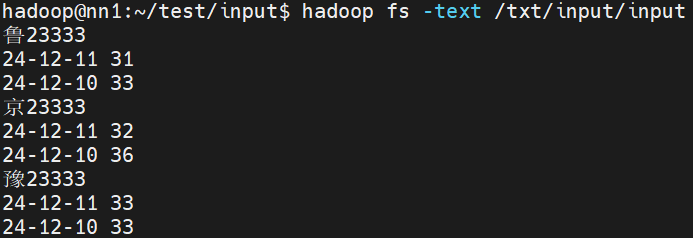
要求:将每个车牌号下的净重求和
AutoRecordReader 代码
package com.lmk.input;

import org.apache.hadoop.conf.Configuration;
import org.apache.hadoop.fs.FSDataInputStream;
import org.apache.hadoop.fs.FileSystem;
import org.apache.hadoop.fs.Path;
import org.apache.hadoop.io.Text;
import org.apache.hadoop.mapreduce.InputSplit;
import org.apache.hadoop.mapreduce.RecordReader;
import org.apache.hadoop.mapreduce.TaskAttemptContext;
import org.apache.hadoop.mapreduce.lib.input.FileSplit;
import org.apache.hadoop.util.LineReader;

import java.io.IOException;

public class AutoRecordReader extends RecordReader<Text, Text> {
    LineReader reader = null;
    Text key = null;
    Text value = null;
    @Override
    // 初始化方法,用来初始化读取文件的输入流
    public void initialize(InputSplit split, TaskAttemptContext context) throws IOException, InterruptedException {
        // 获取切片对象
        FileSplit fs = (FileSplit) split;
        Path path = fs.getPath();

        Configuration conf = new Configuration();
        // 获取文件系统对象
        FileSystem fileSystem = FileSystem.get(conf);
        FSDataInputStream in = fileSystem.open(path);
        // 将字节流输入封装成字符流
        reader = new LineReader(in);


    }

    @Override
    // 确定输入到map方法中的key和value具体的值
    public boolean nextKeyValue() throws IOException, InterruptedException {
        // 初始化key和value
        key = new Text();
        value = new Text();
        // 准备中间变量
        Text temp = new Text();
        // 开始读取数据
        if (reader.readLine(temp) == 0 ){
            return false;
        }

        key.set(temp);
        for (int i = 0; i < 2; i++){
            if (reader.readLine(temp) == 0){
                return false;
            }else {
                value.append(temp.getBytes(), 0, temp.getLength());
                value.append(new Text(" ").getBytes(), 0, 1);
            }
        }
        return true;
    }

    @Override
    // 返回key
    public Text getCurrentKey() throws IOException, InterruptedException {
        return key;
    }

    @Override
    // 返回value
    public Text getCurrentValue() throws IOException, InterruptedException {
        return value;
    }

    @Override
    // 获取当前处理进度
    public float getProgress() throws IOException, InterruptedException {
        return 0;
    }

    @Override
    // 结束
    public void close() throws IOException {
        if (reader!= null){
            reader.close();
        }

    }
}
AutoInputformat 代码
package com.lmk.input;

import org.apache.hadoop.io.Text;
import org.apache.hadoop.mapreduce.InputSplit;
import org.apache.hadoop.mapreduce.RecordReader;
import org.apache.hadoop.mapreduce.TaskAttemptContext;
import org.apache.hadoop.mapreduce.lib.input.FileInputFormat;

import java.io.IOException;

// 泛型指的是输入到map方法的key和value的类型
public class AutoInputformat extends FileInputFormat<Text, Text> {

    @Override
    public RecordReader<Text, Text> createRecordReader(InputSplit split, TaskAttemptContext context) throws IOException, InterruptedException {
        return new AutoRecordReader();
    }
}
Driver 代码
package com.lmk.input;

import org.apache.hadoop.conf.Configuration;
import org.apache.hadoop.fs.FileSystem;
import org.apache.hadoop.fs.Path;
import org.apache.hadoop.io.IntWritable;
import org.apache.hadoop.io.Text;
import org.apache.hadoop.mapreduce.Job;
import org.apache.hadoop.mapreduce.Mapper;
import org.apache.hadoop.mapreduce.lib.input.FileInputFormat;
import org.apache.hadoop.mapreduce.lib.output.FileOutputFormat;

import java.io.IOException;

public class InputDriver {
    public static class AutoMapper extends Mapper<Text, Text, Text, IntWritable>{
        @Override
        protected void map(Text key, Text value, Mapper<Text, Text, Text, IntWritable>.Context context) throws IOException, InterruptedException {
            String[] datas = value.toString().split(" ");
            int sum = Integer.parseInt(datas[1]) + Integer.parseInt(datas[3]);
            context.write(key, new IntWritable(sum));
        }
    }

    public static void main(String[] args) throws IOException, InterruptedException, ClassNotFoundException {
        Configuration conf = new Configuration();
        Job job = Job.getInstance(conf, "Auto");

        job.setJarByClass(InputDriver.class);
        job.setMapperClass(AutoMapper.class);
        job.setNumReduceTasks(0);
        job.setMapOutputKeyClass(Text.class);
        job.setMapOutputValueClass(IntWritable.class);

        // 设置自定义inputformat
        job.setInputFormatClass(AutoInputformat.class);

        FileSystem fs = FileSystem.get(conf);

        if (fs.exists(new Path(args[1]))){
            fs.delete(new Path(args[1]), true);
        }

        FileInputFormat.addInputPath(job, new Path(args[0]));
        FileOutputFormat.setOutputPath(job, new Path(args[1]));

        boolean b = job.waitForCompletion(true);
        System.exit(b?0:1);

    }
}
结果如下

打包项目
增加打包插件
maven的assembly的打包方法在项目中的pom文件中增加assembly插件maven-assembly-plugin
在pom文件中新增build部分
<project xmlns="http://maven.apache.org/POM/4.0.0" xmlns:xsi="http://www.w3.org/2001/XMLSchema-instance"
  xsi:schemaLocation="http://maven.apache.org/POM/4.0.0 http://maven.apache.org/xsd/maven-4.0.0.xsd">
  <modelVersion>4.0.0</modelVersion>
  <groupId>com.hainiuxy</groupId>
  <artifactId>hainiumr</artifactId>
  <version>1.0</version>
  <packaging>jar</packaging>
  <name>hainiu_mr</name>
  <url>http://maven.apache.org</url>
    <properties>
        <!-- 项目编码 -->
        <project.build.sourceEncoding>UTF-8</project.build.sourceEncoding>
        <!-- 编译及输出的时候应用那个版本的jdk -->
        <maven.compiler.source>1.8</maven.compiler.source>
        <maven.compiler.target>1.8</maven.compiler.target>
        <!-- 【修改点】运行的Driver类,是打包运行的主类-->
     <!--<mainClass>com.hainiu.hadoop.mapreduce.mrrun.Driver</mainClass>-->
    </properties>
    <dependencies>
        <!-- https://mvnrepository.com/artifact/org.apache.hadoop/hadoop-client -->
        <dependency>
            <groupId>org.apache.hadoop</groupId>
            <artifactId>hadoop-client</artifactId>
            <version>2.7.3</version>
            <!--已提供范围的依赖在编译classpath (不是运行时)可用。它们不是传递性的,也不会被打包 -->
            <scope>provided</scope>
        </dependency>
    </dependencies>

    <build>
        <resources>
            <resource>

                <directory>src/main/resources</directory>
            </resource>
        </resources>
        <plugins>
            <plugin>

                <groupId>org.apache.maven.plugins</groupId>
                <artifactId>maven-assembly-plugin</artifactId>
                <configuration>

                    <descriptors>
                        <descriptor>src/main/resources/assembly.xml</descriptor>
                    </descriptors>
                    <archive>
                        <manifest>

                            <mainClass>${mainClass}</mainClass>
                        </manifest>
                    </archive>
                </configuration>
                <executions>

                    <execution>
                        <id>make-assembly</id>

                        <phase>package</phase>
                        <goals>
                            <goal>single</goal>
                        </goals>
                    </execution>
                </executions>
            </plugin>
            <plugin>
                <groupId>org.apache.maven.plugins</groupId>
                <artifactId>maven-surefire-plugin</artifactId>
                <version>2.12</version>
                <configuration>
                    <skip>true</skip>
                    <forkMode>once</forkMode>
                    <excludes>
                        <exclude>**/**</exclude>
                    </excludes>
                </configuration>
            </plugin>
            <plugin>
                <groupId>org.apache.maven.plugins</groupId>
                <artifactId>maven-compiler-plugin</artifactId>
                <configuration>
                    <source>8</source>
                    <target>8</target>
                </configuration>
            </plugin>
        </plugins>
        <finalName>MapreduceTest</finalName>
    </build>
</project>
assembly.xml
放入resources目录下
<assembly xmlns="http://maven.apache.org/plugins/maven-assembly-plugin/assembly/1.1.0"
  xmlns:xsi="http://www.w3.org/2001/XMLSchema-instance"    xsi:schemaLocation="http://maven.apache.org/plugins/maven-assembly-plugin/assembly/1.1.0 http://maven.apache.org/xsd/assembly-1.1.0.xsd">
  <!-- TODO: a jarjar format would be better -->
  <!-- 添加到生成文件名称的后缀符 -->
  <id>lmk</id>
  <!-- 打包类型 -->
  <formats>
    <format>jar</format>
  </formats>
  <!--  指定是否包含打包层目录 -->
  <includeBaseDirectory>false</includeBaseDirectory>
  <!-- 指定要包含的文件集 -->
  <fileSets>
    <fileSet>
         <!-- 指定目录 -->
         <directory>${project.build.directory}/classes</directory>
         <!-- 指定文件集合的输出目录,该目录是相对于根目录 -->
         <outputDirectory>/</outputDirectory>
         <!-- 排除文件 -->
         <excludes>
            <exclude>*.xml</exclude>
            <exclude>*.properties</exclude>
         </excludes>
     </fileSet>
  </fileSets>
  <!-- 用来定制工程依赖 jar 包的打包方式 -->
  <dependencySets>
    <dependencySet>
      <!-- 指定包依赖目录,该目录是相对于根目录 -->
      <outputDirectory>/</outputDirectory>
      <!-- 当前项目构件是否包含在这个依赖集合里 -->
      <useProjectArtifact>false</useProjectArtifact>
      <!-- 是否将第三方jar包解压到该依赖中 false 直接引入jar包 true解压引入 -->
      <unpack>true</unpack>
      <!-- 将scope为runtime的依赖包打包到lib目录下。 -->
      <scope>runtime</scope>
    </dependencySet>
  </dependencySets>
</assembly>
刷新maven后,点击插件中assembly下的assembly:assembly进行打包。
打包集群执行
在集群上执行的时候需要增加-D(-Dmapreduce.job.queuename=lmkwordcount)参数才能执行,需要通过ToolRunner提交任务才可以解析-D 参数。
JarSortDriver代码
package com.lmk.jarsort;

import com.lmk.Sort.Truck;
import org.apache.hadoop.conf.Configuration;
import org.apache.hadoop.conf.Configured;
import org.apache.hadoop.fs.FileSystem;
import org.apache.hadoop.fs.Path;
import org.apache.hadoop.io.LongWritable;
import org.apache.hadoop.io.NullWritable;
import org.apache.hadoop.io.Text;
import org.apache.hadoop.mapreduce.Job;
import org.apache.hadoop.mapreduce.Mapper;
import org.apache.hadoop.mapreduce.Reducer;
import org.apache.hadoop.mapreduce.lib.input.FileInputFormat;
import org.apache.hadoop.mapreduce.lib.output.FileOutputFormat;
import org.apache.hadoop.util.Tool;
import org.apache.hadoop.util.ToolRunner;

import java.io.IOException;

public class JarSortDriver extends Configured implements Tool {
    public static void main(String[] args) throws Exception {
        System.exit(ToolRunner.run(new JarSortDriver(), args));
    }
    @Override
    public int run(String[] strings) throws Exception {
        Configuration conf = getConf();
        Job job = Job.getInstance(conf, "sort1");

        job.setJarByClass(JarSortDriver.class);
        job.setMapperClass(JarSortMap.class);
        job.setReducerClass(JarSortReduce.class);
        job.setMapOutputKeyClass(Truck.class);
        job.setMapOutputValueClass(NullWritable.class);
        // 如果map和reduce的输出类型是一致的,可以只定义reduce的输出类型
        job.setOutputKeyClass(Truck.class);
        job.setOutputValueClass(NullWritable.class);

        FileSystem fs = FileSystem.get(conf);
        if (fs.exists(new Path(strings[1]))) {
            fs.delete(new Path(strings[1]), true);
        }

        FileInputFormat.addInputPath(job, new Path(strings[0]));
        FileOutputFormat.setOutputPath(job, new Path(strings[1]));

        boolean b = job.waitForCompletion(true);
        return  b?0:1;
    }

    public static class JarSortMap extends Mapper<LongWritable, Text, Truck, NullWritable>{
        @Override
        protected void map(LongWritable key, Text value, Mapper<LongWritable, Text, Truck, NullWritable>.Context context) throws IOException, InterruptedException {
            String[] s = value.toString().split(" ");
            Truck truck = new Truck(s[0], s[1], Integer.parseInt(s[2]), Integer.parseInt(s[3]));
            // 这里一定要用Truck 对象作为输出键。如果不是Truck,Hadoop 默认的排序机制仍然不会按照这个想要的方式排序
            // context.write(new Text(truck.toString()), NullWritable.get());
            context.write(truck, NullWritable.get());
        }
    }

    public static class JarSortReduce extends Reducer<Truck, NullWritable, Truck, NullWritable> {
        @Override
        protected void reduce(Truck key, Iterable<NullWritable> values, Reducer<Truck, NullWritable, Truck, NullWritable>.Context context) throws IOException, InterruptedException {
            context.write(key, NullWritable.get());
        }
    }

}
maven可以在生命周期中clean重新打包。
集群执行命令hadoop jar MapreduceTest-1.0-lmk.jar com.lmk.jarsort.JarSortDriver -Dmapreduce.job.queuename=lmk /word/words.txt /wcresult
这里需要指定队列的名称,如果忘记有哪些队列,可以使用命令yarn queue -list all查看。
使用短命令(别名)提交jar包
找到案例包中运行的主类
先把jar包拖入idea中,并添加到库中
添加要运行的主类,编写主类代码定义别名。
定义mainClass
在pom文件中的properties加上
<mainClass>com.lmk.driver.DriverTest</mainClass>主类代码
package com.lmk.driver;

import com.lmk.Sort.SortDriver;
import org.apache.hadoop.util.ProgramDriver;

public class DriverTest {
    public DriverTest() {
    }

    public static void main(String[] argv) {
        int exitCode = -1;
        ProgramDriver pgd = new ProgramDriver();

        try {
            pgd.addClass("sort", SortDriver.class , "这是一个排序案例.");
            exitCode = pgd.run(argv);
        } catch (Throwable var4) {
            var4.printStackTrace();
        }

        System.exit(exitCode);
    }
}